Build a free AI booking bot for your small business
Set up a bot that replies on WhatsApp 24/7 and books appointments automatically. No monthly fees.
62% of calls to small businesses go unanswered. Build a free AI booking bot with n8n and WhatsApp that replies 24/7 and sends calendar invites automatically.
A dentist's receptionist works 9 to 5. A WhatsApp message comes in at 8 PM asking about a teeth cleaning. Nobody replies. The person books with the clinic down the street.
The fix is simple. An AI bot reads the message, checks your calendar, and books the slot. You touch nothing.
You can build this with n8n and WhatsApp Business. Both have free tiers that handle 20 to 30 bookings per month. Here is exactly how.
What the bot actually does
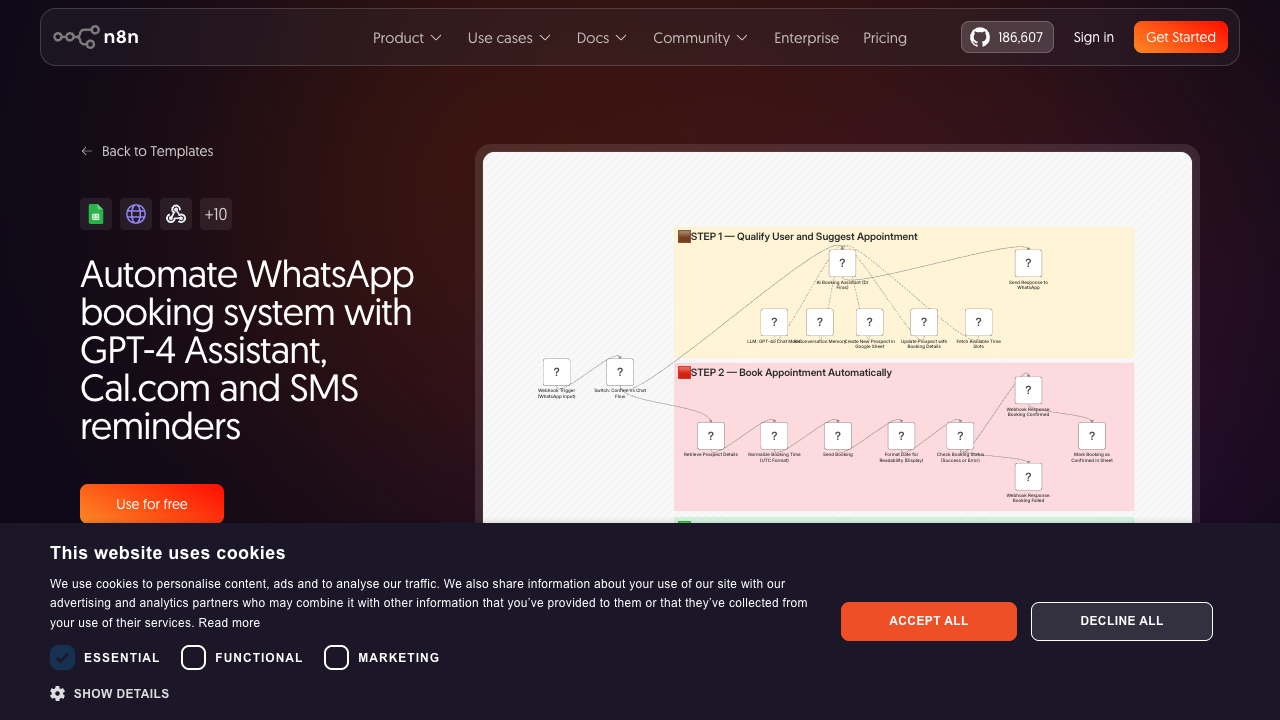
The whole thing runs in 2 steps inside n8n. Step 1 handles the chat. Someone messages your WhatsApp, the AI figures out what they want, checks your real availability on Cal.com, and proposes a time.
Step 2 closes it out. Once they confirm, n8n books the appointment on Cal.com and sends them a confirmation on WhatsApp.
The AI understands natural language. Someone can message "Can I come in Thursday afternoon for a cleanup?" and it handles that. No menus. No forms. No friction.
What you need before you start
Two accounts. Both free tiers work for getting started:
- 1.n8n — sign up at n8n.io. The cloud free tier gives you 2,500 executions per month. That covers 250 to 500 conversations.
- 2.Cal.com — sign up at cal.com. The free tier has unlimited booking pages and calendar integrations.
You also need a WhatsApp Business number. Use a phone number that isn't already on WhatsApp personal. The API is free, and you get 1,000 free messages per month.
You'll also need an OpenAI API key. The AI part uses GPT-4 to understand messages. The cost is about $0.01 per conversation, so $5 to $10 per month for most small businesses.
Step 1: set up your Cal.com booking page
Go to cal.com and create a free account. Connect your Google Calendar or Outlook so Cal.com knows when you're actually available.
Create an event type for each service you want the bot to book. For a dental clinic, that might be "Teeth cleaning — 30 min" and "Consultation — 15 min."
Set your working hours, buffer time between appointments, and how far in advance people can book. Then grab your Cal.com API key from Settings, then Developer, then API Keys. You'll paste this into n8n in a moment.
Cal.com handles the calendar logic. n8n won't have to figure out if you're busy on Thursday at 3 PM. It just asks Cal.com, and Cal.com answers.
Step 2: build the n8n WhatsApp booking automation
Go to n8n.io and use the pre-built template for the WhatsApp booking workflow. Search for "WhatsApp booking Cal.com" in the template library.
Connect your credentials:
- 1.Open the workflow and click the WhatsApp node. Paste your Meta WhatsApp Business API token and phone number ID from your Meta for Developers dashboard.
- 2.Click the OpenAI node. Paste your OpenAI API key. The default model is GPT-4, keep it. It handles ambiguous booking requests much better than GPT-3.5.
Update the system prompt:
Find the GPT-4 node and update the system prompt to match your business. The default says "you are a helpful booking assistant." Replace it with something specific:
You are the booking assistant for [Business Name].
We offer: [list your services with duration and price].
Working hours: [Mon-Fri 9am-6pm, Sat 9am-2pm].

Your job:
1. Find out what service they want
2. Check their preferred day and time
3. Book it via the booking tool
4. Confirm the booking to them

Keep replies short. One question at a time.
If they ask about something you can't help with,
say: "For that, please call us at [phone number]."
This keeps the bot focused. Without a specific prompt, it wanders into topics it shouldn't handle.
Step 3: connect your WhatsApp Business number
In your Meta for Developers dashboard, go to WhatsApp, then Configuration, then Webhook. Set the callback URL to your n8n webhook URL (you'll find it in the webhook node at the start of the workflow).
Set the verify token to anything you want, then paste the same string into the n8n webhook node. Subscribe to the "messages" field. That's the only one you need.
Test it by sending a message to your WhatsApp Business number from any phone. The bot should reply within a few seconds. If it doesn't, check the n8n execution log first, then look at the Meta webhook logs.
What to expect once it's running
The bot handles most booking conversations without you touching anything. Someone messages, the AI replies, they pick a time, it books. You get a Cal.com notification. Done.
A few situations it won't handle well. People who send voice notes instead of text, vague requests that need a human judgment call, and questions about pricing or special circumstances.
For those, have the bot hand off cleanly: "For that, please call us at [number] during business hours."
The n8n free tier runs up to 5 active workflows and 2,500 executions per month. For a small business getting 20 to 30 booking inquiries per month, that's plenty.
Gyms and salons with high WhatsApp volume should consider n8n cloud paid ($20 per month) or self-hosting n8n on a $5 VPS, which gives you unlimited executions.
The actual numbers for a dental clinic
A typical dental clinic in a mid-size city gets 15 to 25 WhatsApp or missed-call inquiries per week outside office hours. At $120 per cleaning, even capturing 4 of those extra bookings per month covers the small cost of this setup many times over.
The same math works for gyms (membership sign-ups, class registrations) and salons (haircut slots, color appointments). The key is that these are people who already want to book. They just hit a wall when nobody answered.
The bot removes that wall.
Trilochan Bhalla
I build AI automations for clinics, real estate teams, and small businesses. Fast chatbots, lead gen systems, and workflow fixes that save you 15+ hours a week.
Related Guides
3 automations that save clinics 15 hours per week
Real automations I built for a dental clinic. They handle reminders, follow-ups, and no-show reduction.
Why your CRM is failing (and how to fix it)
Most CRMs collect dust. Here is why that happens and the 2 changes that make them actually useful.
Custom AI agents: what they are and why you need one
AI agents do work for you. They check data, send messages, and book appointments without you lifting a finger.
Want Custom AI Systems for Your Business?
I build chatbots, workflow automations, and lead gen systems that save you 15+ hours per week. Let's talk.