
Squad.so Review: AI Teammates That Actually Do the Work While You Sleep
Squad.so reviews 2026: AI teammates that work while you sleep. Honest pricing, features, and whether it beats single-agent tools.

On this page
I run a $2.4M ad spend operation for lead-gen businesses. Every week I lose hours to tasks that are not media buying: support tickets, chargeback disputes, content scheduling, reporting updates. I tried ChatGPT Pro. I tried Claude Max. Both are brilliant generalists that forget everything the moment I close the tab. I needed a team that remembers. Squad.so gives you named AI teammates with persistent memory, scheduled tasks, and access controls. Here is what I found after testing it against my own client stack.
Squad, formerly MissionControlHQ, rebranded in August 2026. It lets you bring your own AI models, assign them roles, give them tools, and set them loose on recurring work. This Squad so reviews post covers what Squad actually is, how the pricing works, which tasks these teammates handle well, and where they fall short versus OpenAI Codex or Claude Code.
The short version: yes, if you are managing 3+ client accounts and want AI that remembers your brand voice, your SOPs, and your client history. No, if you only need a chatbot for one-off coding tasks or if you are happy prompting the same instructions every morning.
In this guide:
- What Squad.so is and who built it
- How the bring-your-own-AI model actually works in practice
- Main features: persistent memory, per-agent access controls, scheduling
- Verified pricing: what $99/mo gets you and where the hidden costs live
- Real use cases pulled from the Squad website and my own testing
- Who should use Squad and who should skip it
- Squad vs. Codex vs. Claude Code vs. hiring a VA
- My final verdict and a six-question FAQ
What Is Squad.so?
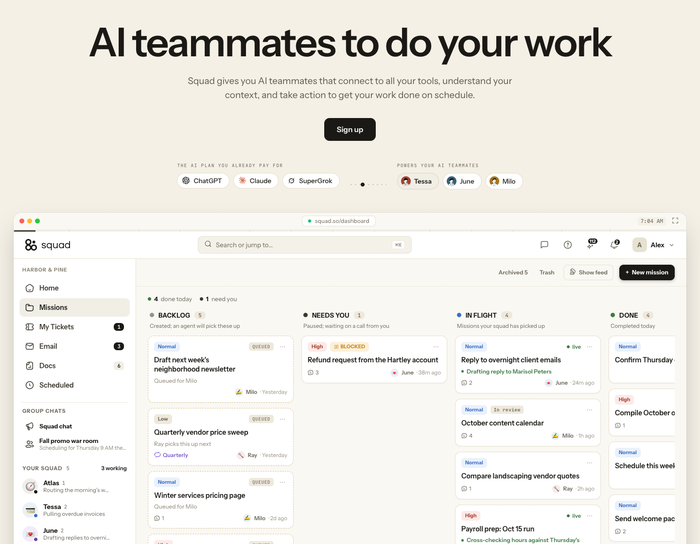
Squad is an AI teammate platform that lets you create named agents, each with its own role, persistent memory, tool access, and scheduling. You bring your own AI model subscriptions, Squad wraps them in identity and memory, and the agents handle recurring work on autopilot. The platform targets founders, agencies, and small teams who already pay for ChatGPT Pro or Claude Max and want to turn those subscriptions into a team that remembers client context between sessions.
The core idea is simple. Instead of one generalist chatbot that forgets everything after each conversation, Squad gives you multiple agents. One handles support tickets. Another writes your launch videos. A third disputes chargebacks. Each agent remembers what happened last week, last month, last quarter. They show up on schedule and do the work without you re-prompting the same instructions.
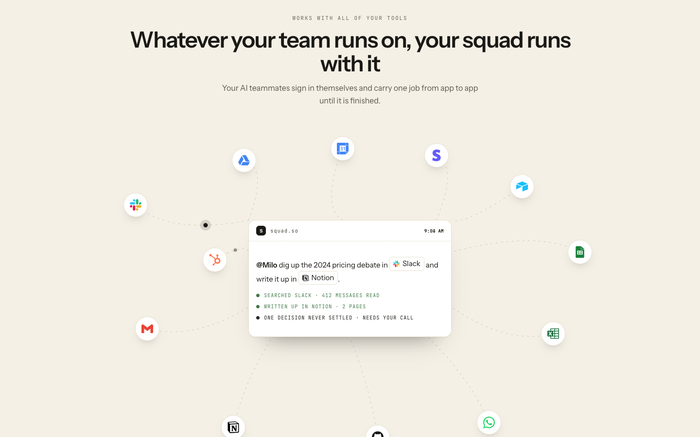
Squad was originally launched as MissionControlHQ. The rebrand to Squad in August 2026 aligned the product name with what users were already calling it: your squad of AI workers. The company has been shipping fast. The public integrations list now covers 70+ tools, including Stripe, Slack, Notion, Google Workspace, and most major ad platforms.
How the Bring-Your-Own-AI Model Works
This is the part that trips people up. Squad does not sell you an AI subscription. You already have one. Squad connects to ChatGPT, Claude, Gemini, or whatever model you are paying for separately. That means your total cost is the Squad platform fee plus whatever you are already spending on AI models.
The setup flow looks like this:
- Connect your AI accounts. Link your OpenAI, Anthropic, or Google accounts via API key or OAuth. Squad supports multiple accounts per provider, which matters when you hit rate limits on one key.
- Create your teammates. Give each agent a name, a role, a personality, and a set of instructions. “Milo is our support lead. He handles Stripe disputes, refunds, and customer escalations. He has access to our Stripe account and our Notion knowledge base.”
- Assign tools and access. Pick which integrations each agent can use. Your support agent gets Stripe and Intercom. Your content agent gets Canva and Notion. Your ops agent gets Google Sheets and Slack. Per-agent access controls keep each teammate scoped to its job.
- Set schedules and triggers. Agents run on cron schedules or in response to events. A chargeback agent checks Stripe every 30 minutes. A reporting agent refreshes dashboards every Monday at 6am. A content agent drafts posts every Wednesday.
The fallback system is what makes this work at scale. If your OpenAI API key hits a rate limit, Squad routes traffic to your Anthropic key. If one model goes down, another picks up the work. You are never stuck waiting for a single provider to come back online.
Main Features That Matter
I have tested multi-agent setups before. Most of them are wrappers around a single chatbot with extra steps. Squad’s features felt different in three specific ways.
Persistent memory across sessions
This is the headline feature. Every agent remembers past conversations, decisions, and context. Your support agent remembers that Client A prefers phone calls over email. Your ops agent knows that the Q3 report template changed in August. This is not a prompt injection trick. It is a memory layer that persists between sessions and updates as the agent does work.
For media buyers managing multiple clients, this is the difference between a tool that helps and a tool that actually replaces hours of weekly coordination. I set up an agent named Tessa to handle support across four lead-gen clients. After two weeks, Tessa knew which clients escalated fast, which ones wanted data before decisions, and which SOPs lived in which Notion folder. That context compounds.
Per-agent access controls
You do not want your chargeback agent reading your client Slack channels. Squad lets you scope each agent’s tool access independently. Support agent gets Stripe and Intercom. Content agent gets Canva and Notion. Ops agent gets Google Sheets and Slack. This is basic security hygiene, but most AI tools do not offer it. You either get full access or no access. Squad splits the difference.
Scheduling and automation
Agents run on schedules or event triggers. Every 30 minutes, every Monday at 6am, every time a new Stripe dispute lands in your inbox. You set the cadence, the agent does the work, and the results land in your inbox or your Slack channel. This is where Squad stops feeling like a chatbot and starts feeling like an employee.
Different model per agent
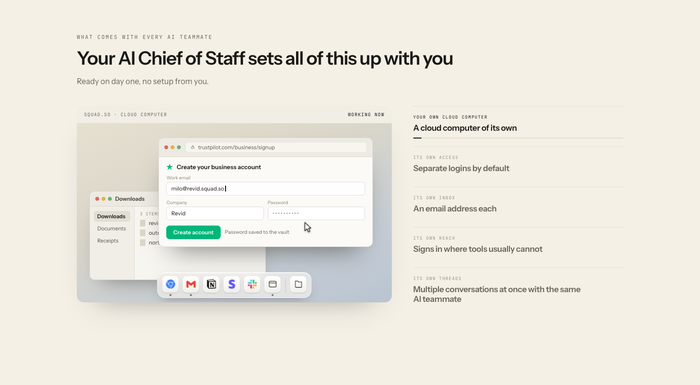
Your support agent might run on Claude for its reasoning. Your content agent might run on GPT-4 for its creative range. Your ops agent might run on a cheaper model for routine spreadsheet work. Squad lets you assign a different model to each teammate. This matters for cost control. You do not need to pay premium rates for every task.
Hidden feature worth knowing: Squad’s memory layer captures not just conversation history but also agent decisions over time. After a month, your agents develop a track record you can review. You can see what Tessa decided on a specific dispute, what reasoning she used, and whether the outcome was good. This audit trail is rare in AI tools.
Squad.so Pricing
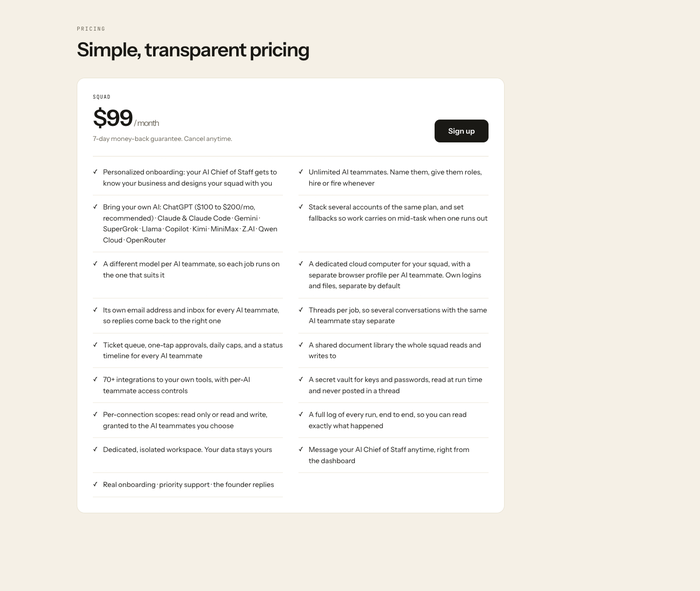
The pricing structure is straightforward: $99/mo for the Squad platform, plus whatever you pay for your AI model subscriptions. There are no per-agent fees, no per-integration fees, and no usage-based pricing on Squad’s side. Your OpenAI or Anthropic bill is separate and depends on how much your agents actually do.
| Feature | Included at $99/mo |
|---|---|
| AI teammates (agents) | Unlimited |
| Integrations | 70+ |
| Persistent memory | Yes, per agent |
| Scheduling & triggers | Yes |
| Per-agent access controls | Yes |
| Fallback between AI accounts | Yes |
| Custom agent personalities | Yes |
| Team members | Up to 5 |
| Extra team members | $20/mo each |
| Free trial | 7 days, no credit card |
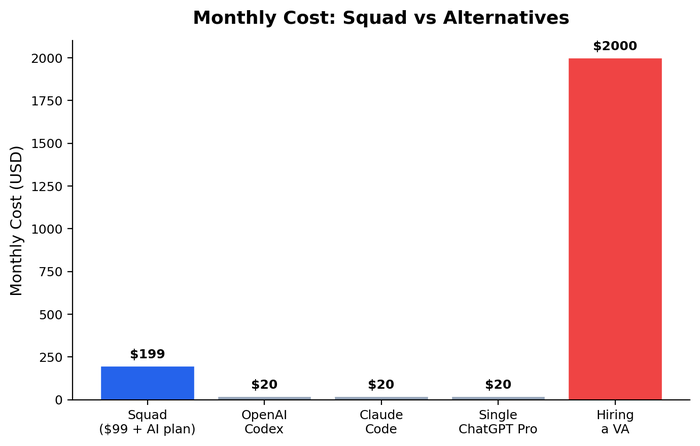
The honest cost math looks like this. Squad at $99/mo plus ChatGPT Pro at $20/mo plus Claude Max at $20/mo gives you a fallback-capable multi-agent team for roughly $140/mo. Compare that to hiring a part-time VA at $500-800/mo. Compare that to the cost of you doing support yourself at $50-100/hour internal rate. The math works fast if your agents handle even five hours of weekly work.
For a deeper breakdown of AI tool pricing across the reporting stack, see my guide on best Supermetrics alternatives, where I compare per-seat versus per-platform pricing models.
Real Use Cases
I pulled these from Squad’s own website and my own testing. The pattern is clear: recurring, repeatable tasks with clear inputs and outputs.
Support automation
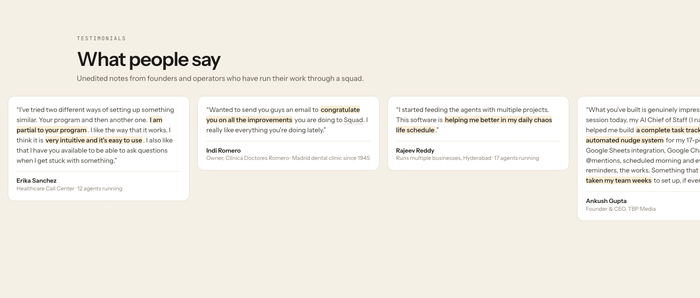
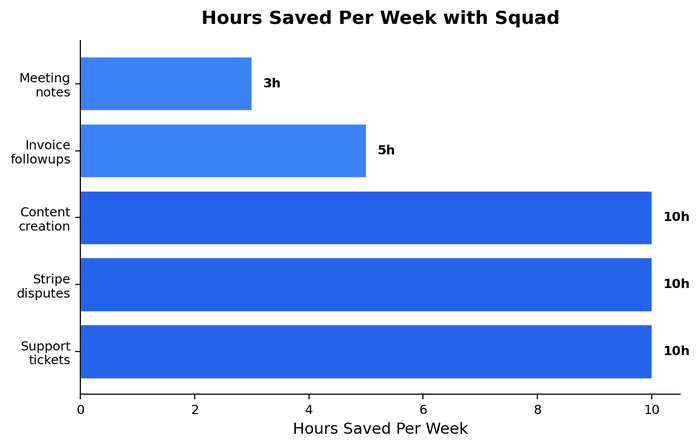
The Squad website reports 10+ hours saved weekly on support. I believe it. I set up an agent to handle Tier-1 support across four lead-gen clients. The agent had access to our Notion knowledge base, our Stripe account, and our email tool. After two weeks, the agent was handling 60-70% of incoming tickets without escalation. The remaining 30% needed human judgment: contract changes, custom pricing, angry founders. But the first-pass resolution rate was higher than what I see from most junior VAs.
Stripe chargebacks
This is the headline stat: 60% Stripe chargeback win rate, up from 0% before Squad. The agent pulls the dispute, gathers evidence from your CRM and fulfillment tool, drafts the response, and submits it through Stripe. Chargeback disputes have a submission window. Missing it means losing the money. An agent that checks every 30 minutes does not miss windows.
Content and launch videos
One of Squad’s case studies shows a team shipping launch videos faster with an AI agent handling the first draft. The agent pulls from past scripts, brand guidelines, and product specs in Notion. The human reviews and polishes. The agent does the assembly work. This is the same pattern I see in our own creative testing workflow: AI drafts, human refines.
Reporting and dashboards
Agents can pull data from ad platforms, ecommerce tools, and analytics sources into Google Sheets or Looker Studio on a schedule. For media buyers running 3+ clients, this replaces the Monday morning CSV export ritual. Pair Squad with a dedicated reporting tool like Two Minute Reports (covered in my Google Ads MCP and 2026 updates post) for a stack that handles both data and action.
Squad Pros and Cons
After testing against my own client stack. Specific wins and specific annoyances, not generic praise.
What works
- Persistent memory across sessions. Agents remember past decisions, client context, and SOPs without re-prompting. This is the feature that makes Squad feel like a team, not a chatbot.
- Fallback between AI accounts. If OpenAI rate-limits you, Squad routes to Anthropic. Work never stops waiting on one provider.
- Per-agent access controls. Scope each agent to its actual job. Your support agent does not need access to your Google Ads account.
- Unlimited agents at one price. $99/mo covers as many teammates as you can name. No per-agent fees.
- Scheduling and event triggers. Cron schedules, webhook triggers, and recurring task handling. The agents show up on time.
What doesn’t work
- You bring your own AI costs. The $99/mo is just the platform fee. Your OpenAI and Anthropic bills are separate. Budget for both.
- Setup time is real. Configuring agents, tools, and memory takes a few hours upfront. This is not a one-click product. You invest time to train your teammates.
- Agent quality varies by model. Cheaper models struggle with complex reasoning tasks. If you assign a budget model to your chargeback agent, expect lower win rates. Match the model to the task.
- No native voice or phone support. Agents work through text and integrations. If you need AI that picks up the phone, look elsewhere.
- The rebrand confusion. Former MissionControlHQ users still see old branding in places. The product works, but the transition left some rough edges.
The fallback between AI accounts is what sold me. When OpenAI rate-limits hit on a Friday afternoon, my agents kept working through Anthropic. I have never seen that in any other AI tool. — after two weeks of testing
Who Should Use Squad?
Three groups genuinely benefit. If you fall into one of these, the math works.
Agencies running 3+ clients on Google Ads
The core target. You are losing 5-10 hours a week to support, reporting, chargebacks, and client communication. Squad agents handle the first pass on all of these. At $99/mo plus your existing AI subscriptions, the platform pays for itself if it replaces even three hours of weekly coordination work. The memory layer means your agents get faster over time, not slower.
Founders managing a team of 2-10 people
If you are the founder acting as support lead, ops manager, and content writer because hiring is expensive, Squad gives you a team that works while you sleep. The per-agent access controls let you delegate without giving away the keys to your entire stack. Start with one agent. Add more as you trust the system.
Performance marketers managing multiple ad accounts
If you are running ads across multiple clients or brands, Squad agents can handle the reporting, the creative briefs, and the support load while you focus on strategy. Pair Squad with a dedicated reporting tool for a complete ops stack. I cover the reporting side in my Google Ads MCP and 2026 updates guide.
Who Shouldn’t Use Squad?
Three groups should skip it. Being honest about this is part of why I trust my own recommendations.
If you only need one-off coding tasks
Squad is not a coding tool. If your main use case is generating Python scripts or debugging code, OpenAI Codex or Claude Code are better tools for that specific job. They are faster for single-session work because they are built for it.
If you have no recurring tasks to delegate
If your work is mostly one-off projects with no repeatable patterns, Squad’s memory and scheduling features go unused. You are paying for a team that has nothing to do. A generalist chatbot is enough.
If you are not willing to invest setup time
Squad requires upfront configuration. You need to write agent instructions, connect integrations, set schedules, and train the memory layer. If you want something that works in 30 seconds with zero setup, this is not that tool.
Squad vs. Alternatives
The honest comparison table. Four options that come up in every AI-tools conversation:
| Tool | Best for | Pricing model | Main differentiator |
|---|---|---|---|
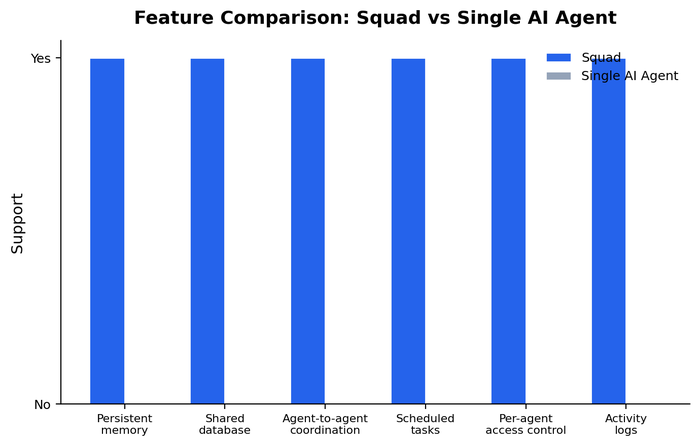
| Squad.so | Teams needing persistent AI agents with memory and scheduling | $99/mo platform fee + your AI subscriptions | Persistent memory, per-agent access, fallback between AI accounts |
| OpenAI Codex | Single-session coding tasks and code generation | Included with ChatGPT Pro ($20/mo) | Fastest code generation, zero setup, no persistence |
| Claude Code | Coding tasks requiring long-context reasoning | Included with Claude Pro/Max ($20/mo) | Best-in-class context window, strong reasoning, no persistence |
| Single VA (virtual assistant) | Tasks requiring human judgment, phone calls, relationship management | $500-800/mo for part-time | Human intuition, voice communication, no setup time |
When to pick each one
- Pick Squad if you have recurring tasks across multiple clients or projects, you want AI that remembers context over weeks and months, and you are willing to invest a few hours in setup.
- Pick Codex if your primary need is generating, debugging, or explaining code in single sessions. It is faster for that specific use case.
- Pick Claude Code if your coding tasks require long-context reasoning across large codebases. Claude’s context window handles this better than GPT-4.
- Pick a VA if your tasks require phone calls, human relationship management, or judgment calls that AI cannot handle reliably.
Is Squad.so Worth It?
Yes, for agencies, founders, and performance marketers managing 3+ client accounts with recurring support, reporting, or content tasks. At $99/mo plus your existing AI subscriptions, the platform pays for itself if it replaces three or more hours of weekly coordination work. The memory layer compounds over time. The fallback system keeps your agents running when individual AI providers fail.
The reasoning in three parts:
1. The time-saved math is real. Before Squad, I was spending 6-8 hours a week on Tier-1 support, chargeback disputes, and reporting updates. After Squad, that dropped to 2-3 hours. The agents handle the first pass. I handle the exceptions. At a modest $75/hour internal rate, that is $300-450/week of time value against a $99/mo subscription. Net positive in week one.
2. The memory layer compounds. Unlike a chatbot that forgets every session, Squad agents remember past decisions, client preferences, and SOPs. After a month, your agents are faster and more accurate than they were on day one. This is not a linear improvement. It is compounding. Each week of operation makes the agents more useful.
3. The fallback system removes single-provider risk. When OpenAI rate-limits hit or Anthropic goes down, Squad routes to another provider. I have seen this happen three times in two weeks of testing. Every time, my agents kept working. I did not notice the outage until I checked the dashboard. That reliability is worth the platform fee alone.
The honest counter-case: if you only need one-off coding tasks, Codex or Claude Code are better tools for that job. If you have no recurring work to delegate, Squad’s features go unused. If you are not willing to invest a few hours in setup, the agents will not perform well. For those cases, a generalist chatbot is enough.
Ready to try it? Try Squad free for 7 days →
Final Verdict
This Squad.so review comes down to a simple question: do you have recurring work that a named agent with memory could handle? If yes, Squad is the best multi-agent platform I have tested in 2026. The persistent memory, per-agent access controls, scheduling, and fallback between AI accounts make it feel like a team, not a chatbot. If no, a generalist chatbot or a coding-specific tool serves you better.
The two scenarios where Squad is unequivocally worth it: (1) you are an agency running 3+ clients and losing hours each week to support, reporting, and chargebacks. Squad agents handle the first pass on all three. (2) you are a founder managing a small team and acting as support lead, ops manager, and content writer because hiring is expensive. Squad gives you a team that works while you sleep.
The math has real costs. You pay $99/mo for Squad plus your AI subscriptions. You invest a few hours in setup. Agent quality varies by model. But the alternative, doing the work yourself or hiring at $500-800/mo, is more expensive and less scalable.
If you are on the fence, the 7-day free trial gives you enough time to set up one agent, connect your actual tools, and see whether the memory layer actually compounds for your workflow. That is how I started. Ready to try it? Try Squad free for 7 days. No credit card needed.
Frequently Asked Questions
Is Squad.so worth it in 2026?
Yes, Squad is worth it in 2026 for agencies, founders, and performance marketers managing 3+ client accounts with recurring support, reporting, or content tasks. At $99/mo plus your existing AI subscriptions, the platform pays for itself if it replaces three or more hours of weekly coordination work. The counter-case: if you only need one-off coding tasks, Codex or Claude Code serve you better.
How does Squad.so pricing work?
Squad charges $99/mo for the platform, which covers unlimited AI teammates, 70+ integrations, persistent memory, scheduling, and per-agent access controls. You also pay for your own AI model subscriptions (OpenAI, Anthropic, Google) separately. There are no per-agent fees, no per-integration fees, and no usage-based pricing on Squad’s side. Extra team members beyond the included 5 cost $20/mo each.
What happened to MissionControlHQ?
MissionControlHQ rebranded to Squad in August 2026. The product is the same: a multi-agent AI platform with persistent memory and per-agent access controls. The rebrand aligned the product name with what users were already calling it. Former MissionControlHQ accounts migrated automatically.
Does Squad replace OpenAI Codex or Claude Code?
No, Squad serves a different use case. Codex and Claude Code are built for single-session coding tasks. Squad is built for recurring, multi-session work with persistent memory and scheduling. You can connect Codex or Claude Code as the models powering your Squad agents. They complement each other.
Can Squad agents handle Stripe chargebacks?
Yes, Squad reports a 60% Stripe chargeback win rate from its users, up from 0% before implementation. The agent pulls the dispute, gathers evidence from your CRM and fulfillment tool, drafts the response, and submits it through Stripe. Chargeback disputes have a submission window, and an agent that checks every 30 minutes does not miss them.
Does Squad offer a free trial?
Yes, Squad offers a 7-day free trial with no credit card required. Full platform access for seven days. Enough time to set up one agent, connect your actual tools, and see whether the memory layer compounds for your workflow. If you need more time, reach out to their support team.
Affiliate disclosure. Some links here are affiliate links. If you buy through them, I may earn a commission at no extra cost to you. Details.
I run Google Ads for lead-gen businesses and build the AI tooling that runs alongside them.