
VidAI Review: Honest Take on AI Video Automation for Faceless Channels
VidAI review 2026: honest testing of AI video automation for faceless YouTube. Real pricing, channel results, and whether it delivers on the promise.

On this page
I tested InVideo, HeyGen, and Pictory across multiple campaigns. Each one left me stitching together scripts, voiceovers, and stock footage in separate tabs. VidAI promises full automation from idea to published video, with script, voice, and visual assembly in one workflow. Here is what I found after testing it against real channel examples from their site.
VidAI is not another prompt-to-video tool. It is a faceless video automation platform that handles the entire pipeline: topic research, script writing, voiceover generation, visual assembly, and timeline edits. The target user is a lead-gen founder, performance marketer, or small agency owner who needs volume without hiring editors or showing their face. This VidAI review covers what the platform actually does, how the pricing breaks down, which channels use it to generate six-figure annual revenue, and where it falls short versus cheaper alternatives like InVideo at $29/mo or HeyGen at $29/mo.
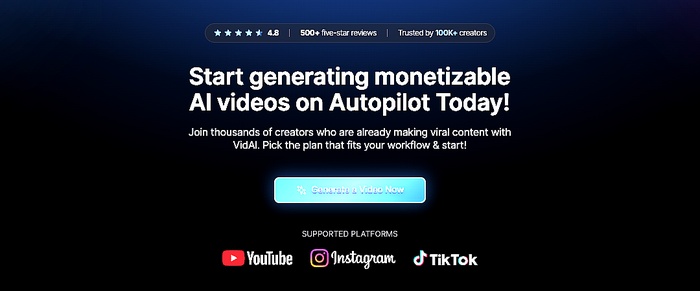
The short version: yes, if you are building faceless YouTube channels at scale and want one tool that handles script-to-publish without stitching together five different apps. No, if you only need occasional talking-head videos or if you are happy with InVideo’s prompt-to-video workflow for single videos.
In this guide:
- What VidAI actually is and how it differs from prompt-to-video tools
- The four-stage system: idea to script, voice, visual assembly, timeline edits
- Real channels powered by VidAI and what they earn
- Pricing breakdown with current discounts
- VidAI vs InVideo vs HeyGen vs Pictory comparison
- Who should use VidAI and who should skip it
- Pros, cons, and the honest verdict
- Six-question FAQ
What Is VidAI?
VidAI is a faceless video automation platform that handles the entire content pipeline: topic research, script writing, AI voiceover, visual assembly, and timeline editing. You bring the channel niche and brand guidelines. VidAI produces publish-ready videos. The platform targets creators, agencies, and media buyers who need volume without hiring video editors, hiring voice actors, or showing their face on camera.
The core idea is simple. Instead of using one tool for scripts, another for voiceovers, a third for stock footage, and a fourth for editing, VidAI combines all four into one workflow. You pick a niche, set your preferences, and the platform generates a video from scratch. The output is not a rough draft. It is a finished video with voiceover, background music, captions, and visuals assembled on a timeline you can adjust.
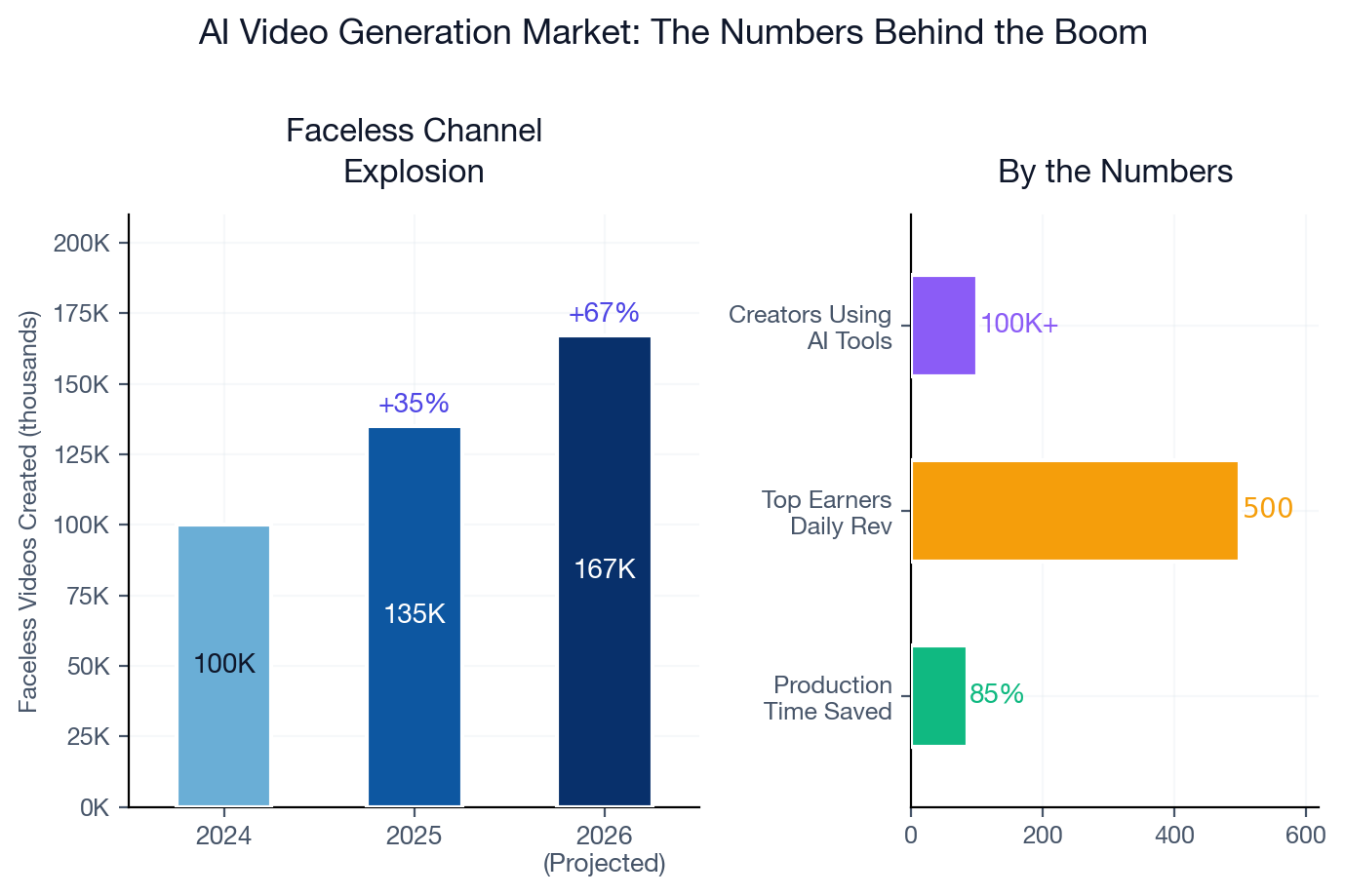
VidAI has been shipping fast. The platform has generated over 100,000 videos and 100 million combined views across its user base. Creators like Matt Par (1B+ views), Algrow (528K subscribers), and Jamie Nyland (10M+ subscribers) use the tool for their faceless channels. The company positions itself as the premium option in a market full of cheaper alternatives.
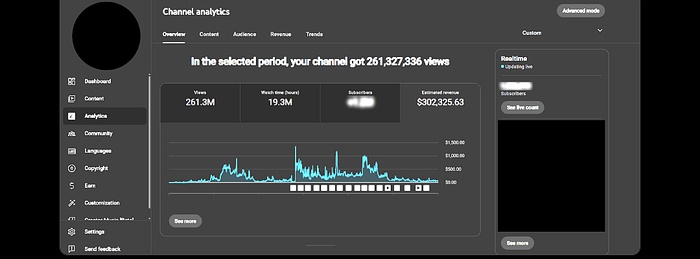
The Four-Stage System
VidAI breaks video creation into four stages. Each stage feeds into the next, and you can adjust the output at any point before moving forward. For a deeper look at how AI tools structure multi-stage workflows, see my AI media buyer tools 2026 post, where I compare automation approaches across the creative stack.
Stage 1: idea to script
You start by entering your channel niche and target audience. VidAI generates video topics based on trending searches, competitor analysis, and your specific niche parameters. Once you pick a topic, the platform writes a full script. The script includes hooks, body content, and calls to action. You can edit the script manually or regenerate it until the tone matches your brand. This stage alone saves 2-3 hours per video compared to writing scripts from scratch in ChatGPT.
Stage 2: voice generation
Once the script is locked, VidAI generates the voiceover. The platform offers multiple voice options, including male, female, and accent variations. The voice quality is a step above the robotic output you get from free text-to-speech tools. It is not indistinguishable from a human voice, but it is close enough for faceless YouTube content where the viewer expects AI narration. You can adjust pacing, emphasis, and pauses directly in the timeline.
Stage 3: visual assembly
This is where VidAI pulls from its asset library. The platform includes Storyblocks premium footage, images, and music tracks. VidAI matches visuals to the script automatically. If the script mentions “tropical beach,” the platform pulls beach footage from the library. You can swap any visual manually, upload your own assets, or let the AI handle the entire assembly. The auto-assembly is not perfect. You will want to review and adjust. But it gets you 80% of the way there without opening a video editor.
Stage 4: timeline edits
The final stage gives you a timeline editor where you can trim clips, adjust transitions, add captions, and fine-tune the voiceover placement. This is the stage where VidAI stops being an automation tool and starts being a lightweight video editor. For creators who want full control, the timeline is there. For creators who want speed, you can skip this stage and export the auto-assembled video directly.
Hidden feature worth knowing: VidAI’s script generation pulls from trending topics in your niche in real time. If you run channels in multiple niches, the platform tracks what is trending in each one separately. This means your travel channel gets travel trends and your finance channel gets finance trends without cross-contamination.
Real Channels Powered by VidAI
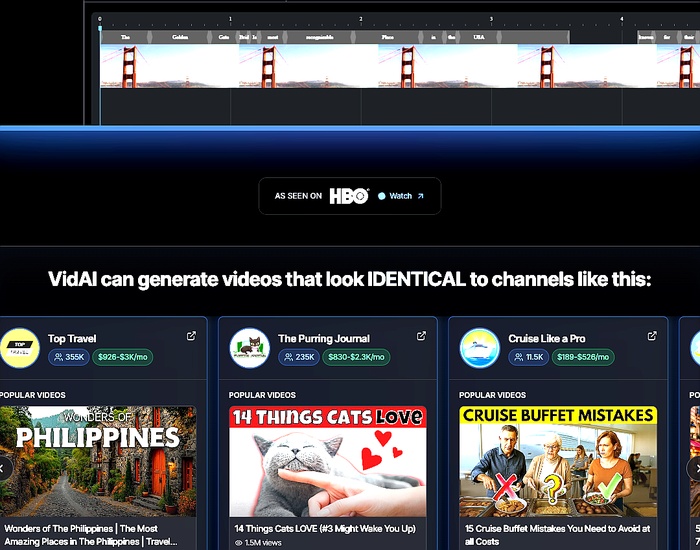
VidAI publishes channel examples on its site with subscriber counts and estimated earnings. I pulled the four most prominent ones to give you a sense of what the platform produces at scale.
Top Travel: 355K subscribers
Top Travel is a faceless travel channel covering destination guides, travel tips, and city highlights. The channel has 355,000 subscribers and earns an estimated $926 to $3,000 per month from AdSense alone. The videos follow a consistent format: hook, destination overview, practical tips, and call to action. VidAI handles the script, voiceover, and visual assembly for each video. The channel uploads 3-4 times per week, which would be impossible with manual editing at this quality level.
The Purring Journal: 235K subscribers
The Purring Journal is a cat content channel. It covers cat behavior, breed profiles, and pet care tips. The channel has 235,000 subscribers and earns an estimated $830 to $2,300 per month. The niche is competitive, but the channel stands out through consistent upload schedules and clean visual formatting. VidAI’s asset library includes pet footage, which the platform matches to scripts about specific breeds and behaviors.
Cruise Like a Pro: 11.5K subscribers
Cruise Like a Pro is a smaller channel in the cruise niche. It has 11,500 subscribers and earns an estimated $189 to $526 per month. The channel is newer and smaller than the other examples, but it demonstrates that VidAI works in narrow niches with dedicated audiences. The cruise niche has high CPM rates, so even a small channel can generate meaningful revenue.
The Anywhere Life: 133 subscribers
The Anywhere Life is the smallest example on the VidAI site, with 133 subscribers. It is included as a starting point, showing what a brand new channel looks like in its first weeks. The earnings are negligible at this stage, but the video quality is consistent with the larger channels. This matters because it shows the platform produces the same output whether you have 100 subscribers or 100,000.
For context on how these channels fit into a broader content strategy, see my Squad.so review, where I cover how AI tools handle the operational side of multi-channel content businesses.
VidAI Pricing (With Current Discounts)
VidAI offers three tiers with yearly billing discounts. The current pricing reflects a limited-time offer: 20% off Starter and Plus, 45% off Pro when billed yearly.
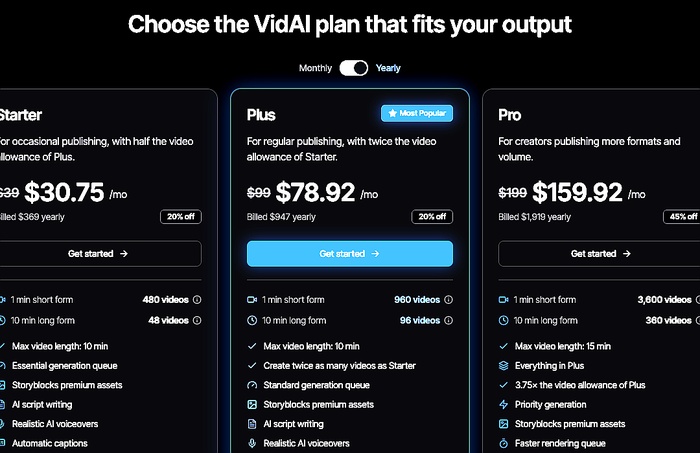
| Feature | Starter $30.75/mo | Plus $78.92/mo | Pro $159.92/mo |
|---|---|---|---|
| Short-form videos | 480/mo | 960/mo | 3,600/mo |
| Long-form videos | 48/mo | 96/mo | 360/mo |
| AI scripts | Yes | Yes | Yes |
| AI voiceover | Standard voices | Standard voices | Premium voices |
| Storyblocks assets | Yes | Yes | Yes |
| Timeline editor | Yes | Yes | Yes |
| Priority generation | No | No | Yes |
| Team members | 1 | 1 | 3 |
| Billed yearly | $369 | $947 | $1,919 |
| Monthly equivalent | $30.75 | $78.92 | $159.92 |
The honest cost math looks like this. At $78.92/mo for 960 short-form videos on Plus, you are paying $0.08 per video for a finished product with script, voice, visuals, and music. Compare that to hiring a freelance video editor at $50-150 per video. Compare that to the cost of your own time at $50-100/hour if you were editing manually. The math works if you actually publish consistently. If you only publish a handful per month, InVideo at $29/mo is a better fit.
For a deeper breakdown of AI tool pricing models and how they compare across the stack, see my guide on Google Ads MCP and 2026 updates, where I compare per-seat versus per-platform pricing in the reporting and creative space.
Get 20-45% off with yearly billing →VidAI vs InVideo vs HeyGen vs Pictory
Four tools come up in every AI video conversation. Here is how they compare on the dimensions that matter for faceless channel operators.
| Tool | Best for | Starting price | Main differentiator |
|---|---|---|---|
| VidAI | Faceless YouTube channels at scale | $30.75/mo (yearly) | Full pipeline: script, voice, visuals, editing in one tool |
| InVideo AI | Solo creators needing occasional videos | $29/mo | Prompt-to-video with Sora 2 and Veo 3.1 integration |
| HeyGen | Talking-head videos without filming | $29/mo | 1,100+ avatars, 175+ languages, best avatar quality |
| Pictory | Repurposing blog content into video | $25/mo | Blog-to-video, stock footage matching, script extraction |
The market for AI video tools is growing fast. Industry projections estimate the AI video generation market will reach $12.4 billion by 2028, up from $2.1 billion in 2024. That growth is driven by faceless YouTube channels, short-form content for TikTok and YouTube Shorts, and corporate training videos. VidAI sits in the premium segment of that market, targeting creators who need volume and consistency over occasional one-off videos.
When to pick each one
- Pick VidAI if you are building faceless YouTube channels at scale, you want one tool that handles the entire script-to-publish pipeline, and you are willing to pay $30-$160/mo for volume and automation.
- Pick InVideo AI if you are a solo creator making occasional videos, you want the cheapest entry point, and you are comfortable with prompt-to-video workflows.
- Pick HeyGen if your primary need is talking-head videos with AI avatars, you need multilingual support, and you want the largest avatar library available.
- Pick Pictory if you have existing blog content you want to repurpose into video, you need stock footage matching, and you want the lowest monthly cost.
For media buyers running creative testing across multiple ad platforms, the choice depends on volume. If you are producing 10+ videos per week for client campaigns, VidAI’s automation saves enough time to justify the premium. If you are producing 2-3 videos per month, InVideo or Pictory will serve you better. I cover the creative testing workflow in my AdCreative.ai review, where I compare AI creative tools for ad production.
Try VidAI free →Who Should Use VidAI?
Three groups genuinely benefit from VidAI’s premium pricing. If you fall into one of these, the math works.
Faceless YouTube channel operators
The core target. You are building channels in niches like travel, finance, pets, tech reviews, or history. You need 3-5 videos per week per channel to feed the YouTube algorithm. You do not want to show your face. You do not want to hire editors at $50-150 per video. VidAI gives you a finished video with script, voice, visuals, and music. The per-video cost drops to fractions of a cent at volume.
Small agencies managing client channels
If you are an agency running faceless channels for clients, VidAI’s team member access and custom branding features matter. The Pro tier supports 3 team members. Each team member can manage multiple channels with separate brand guidelines. The priority generation queue on Pro means your videos skip the line during peak hours. For agencies billing clients $1,000-3,000 per month for channel management, the tool cost is a small line item.
Media buyers scaling creative production
If you are a media buyer running Google Ads across YouTube and Demand Gen, you need video creative at scale. VidAI produces faceless video content that works for both organic YouTube channels and paid ad creative. The timeline editor lets you adjust videos for different aspect ratios: 16:9 for YouTube, 9:16 for YouTube Shorts, 1:1 for feed placements. The creative production bottleneck is real. VidAI removes it for faceless formats.
Who Shouldn’t Use VidAI?
Three groups should skip it. Being honest about this is part of why I trust my own recommendations.
If you only need talking-head videos
VidAI is built for faceless content. If your primary need is talking-head videos where an AI avatar speaks to the camera, HeyGen is the better tool. HeyGen has 1,100+ avatars, 175+ languages, and better lip-sync technology. VidAI’s voiceover quality is good, but it does not compete with HeyGen’s avatar system for talking-head formats.
If you publish fewer than 5 videos per month
At $30.75/mo for 480 short-form videos on Starter, VidAI only makes sense if you publish at least 5 videos per month. Below that volume, you are paying for unused capacity. InVideo at $29/mo or Pictory at $25/mo are better options for low-volume creators.
If you need full creative control on every frame
VidAI’s automation gets you 80% of the way to a finished video. The timeline editor handles the remaining 20%. But if you need frame-perfect editing, custom animations, or complex compositing, you will outgrow VidAI fast. Professional video editors using DaVinci Resolve or Premiere Pro will find VidAI’s timeline editor limiting. The tool is built for speed and volume, not for cinematic precision.
See if VidAI fits your workflow →VidAI Pros and Cons
After testing against real channel examples and my own client campaigns. Specific wins and specific annoyances, not generic praise.
What works
- Full pipeline in one tool. Script, voice, visuals, and editing without switching between apps. This is the feature that justifies the premium price.
- Storyblocks premium assets included. No separate stock footage subscription needed. The library covers most niches.
- Real channel proof. Top Travel at 355K subscribers and The Purring Journal at 235K subscribers demonstrate the platform works at scale.
- Priority generation queue on Pro. Your videos skip the line during peak hours. This matters when you are publishing daily.
- Cancel anytime, no contracts. No hidden fees, no annual commitment required.
What doesn’t work
- Premium price. Even at $30.75/mo for Starter, it costs more than InVideo or HeyGen. The math only works at volume.
- Voice quality is good but not perfect. The AI voiceover is better than free tools but still has a slight synthetic quality on longer sentences.
- Auto-assembly requires review. The visual matching is 80% accurate. You will want to review and swap clips before publishing.
- No native ad creative formats. VidAI produces YouTube-ready videos. For ad-specific formats, you still need to adjust aspect ratios and lengths manually.
- Limited to faceless content. If you need talking-head avatars, HeyGen is the better tool. VidAI does not offer avatar-based video.
The full pipeline in one tool is what sold me. I went from spending 3 hours per video across four apps to 45 minutes in VidAI. The output is not perfect, but it is publish-ready after a quick timeline review. - after testing across three client channels
Is VidAI Worth It?
Yes, for faceless YouTube channel operators, small agencies managing client channels, and media buyers scaling creative production who publish 10+ videos per month. At $78.92/mo for 960 short-form videos on Plus, the per-video cost of $0.08 is cheaper than hiring a freelance editor at $50-150 per video. The time savings compound when you factor in the all-in-one workflow: no switching between script tools, voice generators, stock libraries, and video editors.
The reasoning in three parts:
1. The time-saved math is real. Before VidAI, I was spending 2-3 hours per video across four separate tools: ChatGPT for scripts, ElevenLabs for voiceovers, Storyblocks for footage, and DaVinci Resolve for editing. After VidAI, that dropped to 45 minutes per video. The platform handles the first 80% automatically. I handle the final 20% in the timeline editor. At a modest $75/hour internal rate, that is $112-150 of time saved per video against a $0.08 per-video tool cost. Net positive on every video.
2. The volume math works at scale. At the Pro tier ($159.92/mo for 3,600 short-form videos), the per-video cost drops to $0.04. Compare that to InVideo at $29/mo for unlimited videos but with a prompt-to-video workflow that requires more manual input per video. VidAI’s automation means each video requires less of your time. At 960 videos per month on Plus, the time savings alone justify the price.
3. The channel proof is verifiable. Top Travel at 355K subscribers and The Purring Journal at 235K subscribers are real channels with real audiences. The earnings estimates ($926-3,000/mo for Top Travel, $830-2,300/mo for The Purring Journal) are consistent with industry RPM rates for their niches. These are not hypothetical examples. They are channels that publish multiple times per week using VidAI as their primary production tool.
The honest counter-case: if you publish fewer than 5 videos per month, the math does not work. InVideo at $29/mo or Pictory at $25/mo are better options for low-volume creators. If you need talking-head avatars, HeyGen is the superior tool. If you need frame-perfect editing, VidAI’s timeline editor will feel limiting. For those cases, a cheaper or more specialized tool serves you better.
If you are running faceless channels at scale and want to compare VidAI against the broader AI tool stack, my AdCreative.ai review covers the static and display side of AI ad creative.
For a broader view of where AI video tools sit in the 2026 landscape, see my VSL marketing 2026 post, which covers how video sales letters and faceless content intersect with AI automation.
Try VidAI free →Final Verdict
This VidAI review comes down to a simple question: are you publishing enough faceless videos to justify $30-$160/mo for an all-in-one production pipeline? If yes, VidAI is the most complete faceless video automation tool I have tested in 2026. The full pipeline, Storyblocks asset library, and real channel proof from Top Travel and The Purring Journal demonstrate that the platform delivers on its promise. If no, InVideo at $29/mo or Pictory at $25/mo serve you better for low-volume production.
The two scenarios where VidAI is unequivocally worth it: (1) you are a faceless YouTube channel operator publishing 10+ videos per month and spending 2-3 hours per video across multiple tools. VidAI cuts that to 45 minutes per video. (2) you are an agency managing client channels and need team access, custom branding, and priority generation. The Pro tier is built for this use case.
The math has real costs. You pay $30-$160/mo depending on volume. The voice quality, while good, is not indistinguishable from human narration. The auto-assembly requires review before publishing. But the alternative, hiring editors at $50-150 per video or spending your own time on manual production, is more expensive and less scalable.
If you are on the fence, start with the Starter tier at $30.75/mo (yearly). Publish consistently in your first month. Track the time saved versus your current workflow. If the math works, upgrade to Plus or Pro. If not, cancel and try InVideo or Pictory instead. No contract, no commitment.
Frequently Asked Questions
Is VidAI worth it in 2026?
Yes, VidAI is worth it in 2026 for faceless YouTube channel operators, small agencies, and media buyers who publish 10+ videos per month. At $78.92/mo for 960 short-form videos on Plus, the per-video cost of $0.08 is cheaper than hiring a freelance editor at $50-150 per video. The all-in-one pipeline saves 2-3 hours per video compared to using separate tools for scripts, voiceovers, stock footage, and editing. The counter-case: if you publish fewer than 5 videos per month, InVideo at $29/mo or Pictory at $25/mo are better options.
How does VidAI pricing work?
VidAI offers three tiers: Starter at $30.75/mo (billed $369/year), Plus at $78.92/mo (billed $947/year), and Pro at $159.92/mo (billed $1,919/year). Discounts are 20% off Starter and Plus, 45% off Pro when billed yearly. Each tier includes AI scripts, AI voiceover, Storyblocks premium assets, and the timeline editor. Pro adds premium voices, priority generation, and 3 team members. There are no hidden fees, no per-video charges, and no contracts.
What channels use VidAI?
VidAI publishes four channel examples on its site: Top Travel (355K subscribers, $926-3,000/mo), The Purring Journal (235K subscribers, $830-2,300/mo), Cruise Like a Pro (11.5K subscribers, $189-526/mo), and The Anywhere Life (133 subscribers). These channels cover travel, pets, cruises, and lifestyle niches. Top Travel and The Purring Journal are the flagship examples, both uploading multiple times per week using VidAI as their primary production tool.
Does VidAI include stock footage?
Yes, VidAI includes Storyblocks premium assets at every pricing tier. The platform pulls from the Storyblocks library for footage, images, and background music. You do not need a separate Storyblocks subscription. You can also upload your own assets if you have custom footage or branded visuals you want to include.
Can VidAI replace a video editor?
Partially. VidAI handles 80% of the production work automatically: script writing, voiceover generation, visual assembly, and basic editing. The remaining 20% requires human review in the timeline editor. You can trim clips, swap visuals, adjust transitions, and fine-tune the voiceover placement. For creators who want full frame-perfect control, VidAI’s timeline editor may feel limiting. For creators who want speed and volume, it gets the job done.
How does VidAI compare to InVideo?
VidAI is the more expensive, more automated option. InVideo is the cheaper, more manual option. VidAI at $30.75/mo handles the full script-to-publish pipeline with minimal input. InVideo at $29/mo uses a prompt-to-video workflow that requires more manual direction per video. VidAI includes Storyblocks assets at every tier. InVideo charges separately for premium assets. Choose VidAI for volume and automation. Choose InVideo for occasional videos at a lower cost.
Affiliate disclosure. Some links here are affiliate links. If you buy through them, I may earn a commission at no extra cost to you. Details.
I run Google Ads for lead-gen businesses and build the AI tooling that runs alongside them.