
Two Minute Reports Review: A Media Buyer's Honest Take After 14 Months
I didn't want another tool. I wanted my time back. This Two Minute Reports review covers the real workflow, the per-destination pricing, and the one type of team that shouldn't bother paying for it.

On this page
- What is Two Minute Reports?
- How does Two Minute Reports work?
- Two Minute Reports features
- Two Minute Reports integrations
- Two Minute Reports pricing
- Two Minute Reports pros and cons
- Who should use Two Minute Reports?
- Who shouldn't use Two Minute Reports?
- Two Minute Reports alternatives
- Is Two Minute Reports worth it?
- Final verdict
- Frequently asked questions
I used to lose every Monday morning to client reports. Four hours of pulling CSV exports from Google Ads, GA4, Shopify, Klaviyo, stitching them into one Google Sheet, rebuilding the same Looker Studio dashboard for the nth time. By noon, half my day was gone. If you want to skip the setup, Two Minute Reports has a free 14-day trial — no credit card, Pro plan unlocked for 14 days.
Two Minute Reports changed that math. It’s a marketing reporting tool that pulls data from 30+ ad, ecommerce, analytics, and CRM sources and pushes it into Looker Studio, Google Sheets, or its own AI dashboards on a schedule. Fourteen months in on the Pro tier, my Monday reports now take under twenty minutes. This Two Minute Reports review covers what works, what doesn’t, the pricing math nobody shows, and whether it’s actually worth it in 2026.
The short version: yes, for agencies and in-house teams running 3+ client accounts in Google Ads. No, if you only have one client or want a branded client portal — there are better tools for that.
In this guide:
- What Two Minute Reports actually is, who it’s built for
- How the workflow looks in practice with a real dashboard screenshot
- Every feature that matters, including the 2025/2026 additions like MCP
- The full integration list, broken down by category
- Verified 2026 pricing with the per-destination math nobody shows
- Honest pros and cons after fourteen months
- Who should use it, who shouldn’t, and the alternatives table
- My final verdict and a six-question FAQ
What is Two Minute Reports?
Two Minute Reports is a marketing reporting platform that connects to 30+ ad, ecommerce, analytics, and CRM sources and pushes data into Looker Studio, Google Sheets, or its own AI dashboards on a schedule, replacing manual CSV exports and API scripts with one managed connector layer. It targets agencies, in-house marketing teams, and freelancers managing multiple clients who need a single source of truth for paid media, ecommerce, and analytics reporting. The platform lives inside Google’s ecosystem (Looker Studio + Sheets) plus its native AI dashboards, so it sidesteps the “yet another dashboard tool” problem by putting data where most marketers already work.
The core promise is right there in the name: connect, build, refresh, deliver. Most connectors take under two minutes from auth to first row. That’s the actual differentiator versus Supermetrics (older, more expensive, same Looker Studio output) or DashThis (locked into its own UI). TMR sits in the middle: cheaper than Supermetrics at Pro, more flexible than DashThis because it doesn’t trap your data.
Who’s it really for? In practice I’ve seen three groups win with it:
- Agencies running 3+ clients — the per-destination and per-account add-ons stop hurting once you’re billable enough on the other side
- In-house marketing teams managing one brand across many channels who want to stop maintaining hand-rolled API scripts
- Freelance media buyers who charge monthly retainers and need white-label reports without a logo swap
If that’s you, try Two Minute Reports with no credit card.
How does Two Minute Reports work?
The workflow is the same for almost every connector: authenticate, pick metrics, choose a destination, set a schedule. The platform abstracts the API token refresh, rate-limit handling, and query batching that you would otherwise be writing Python scripts for. Here’s the five-step flow:
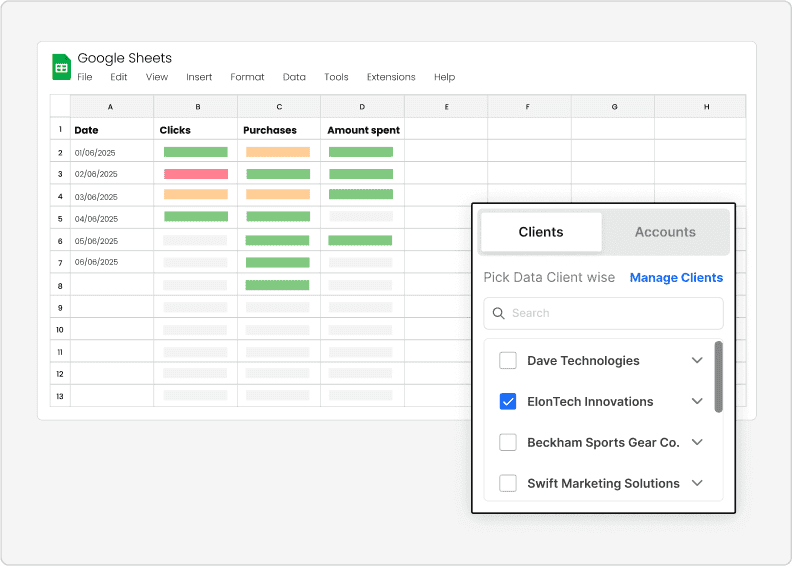
- Connect a data source — pick from 30+ connectors, click ”+ add new connection,” complete the OAuth flow. Pro gives 30 accounts per connector, which covers most agencies.
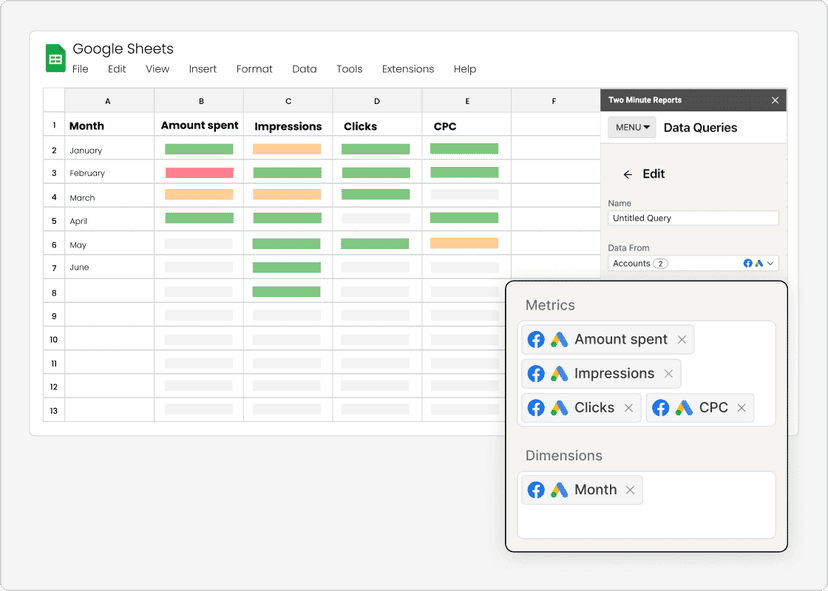
- Write or pick a query — use the visual query builder or drop in a custom SQL-like query. Spend, ROAS, CPA, CTR, conversion rate, revenue are first-class fields.
- Send to a destination — pick Looker Studio (most popular), Google Sheets, or native AI dashboards. Only one destination included per plan; additional destinations add $41/mo each. More in the pricing section — it’s the most common billing surprise.
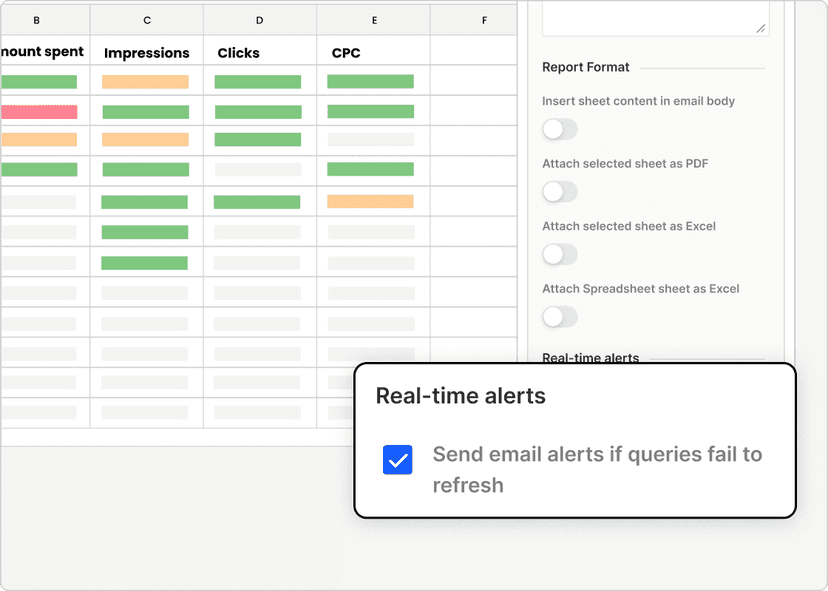
- Schedule it — Pro and Business support hourly. Lite is daily/weekly/monthly. For Monday reports, daily at 6am works fine and keeps Looker Studio fast.
- Alert on anomalies — set thresholds on spend, ROAS, or CPA. The alerts module pings you. Saved a client account last quarter when a campaign burned cash at 3am.
That screenshot is the actual dashboard I look at every Monday. Google Ads spend on the left, Shopify revenue on the right, with ROAS overlaid. The whole thing refreshes before I wake up. The hourly refresh on Pro is the single biggest time-saver versus Supermetrics’ older 24-hour cycle. If you only run one client, none of this matters — but at 3+ clients, this blend alone pays for the subscription.
If you’re already running Looker Studio dashboards, the integration is invisible — TMR shows up as just another data source. If you’re a Google Sheets shop, the data lands in a clean table you can pivot or share.
Two Minute Reports features
Fourteen months on Pro — here are the features that moved the needle. Skipping the ones nobody uses, calling out the ones that pay for the subscription in week one.
Automated reporting
The core. You connect once, build the query once, and the platform refreshes on schedule forever. The setup is the product. Before TMR, I was running four Python scripts for the same job and each broke at least once a quarter.
Per-query scheduling means a low-priority Klaviyo query can run daily while a high-priority Google Ads query runs hourly — without penalty. Matters when you’re running 20+ client dashboards.
Data integrations
30+ native connectors out of the box: Google Ads, TikTok Ads, LinkedIn Ads, Reddit Ads, Microsoft Ads, Pinterest Ads, GA4, Shopify, WooCommerce, Klaviyo, HubSpot, Mailchimp, Amazon Ads, Amazon Seller Central. The full list is on the the integrations page.
For my client base, the headline integrations are Google Ads, TikTok, Shopify, Klaviyo, GA4 — five connectors cover ~90% of reporting work.
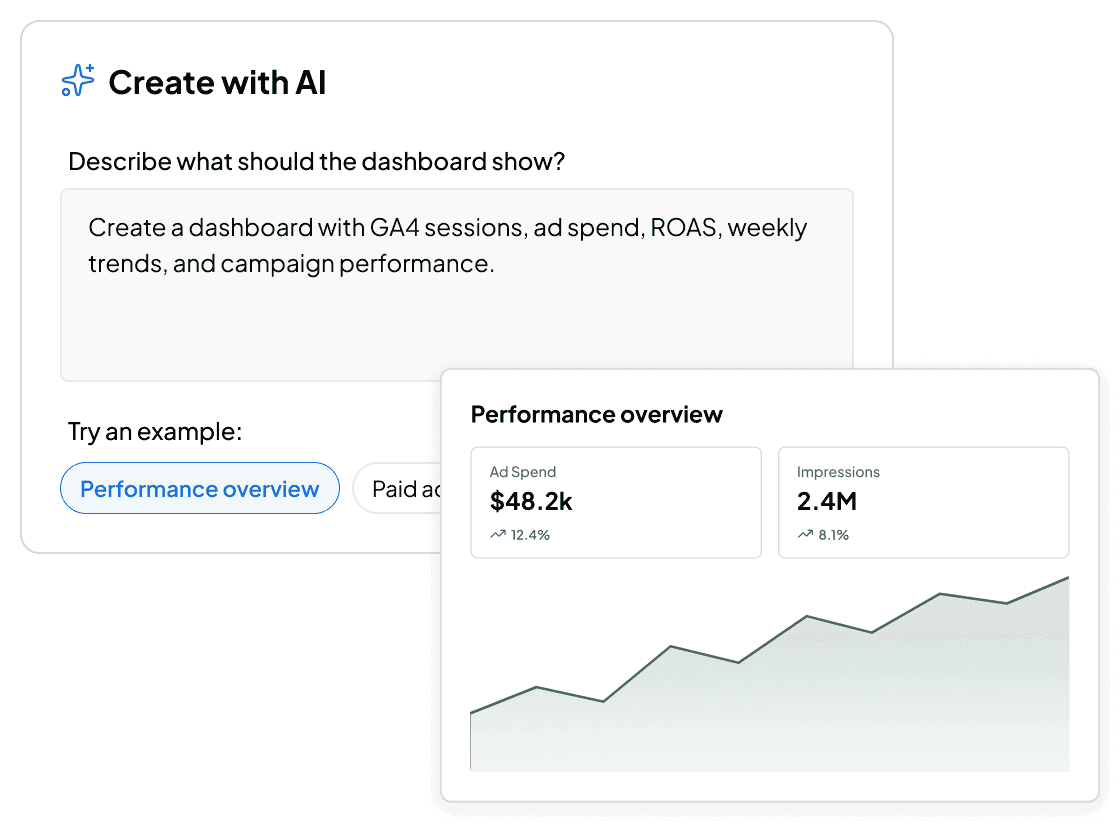
AI dashboards
The 2025 feature I didn’t expect to use. AI dashboards are TMR’s native dashboard surface — no Looker Studio dependency. Looker Studio reports using heavy blends can take 30-90 seconds to load; AI dashboards load instantly because rendering is server-side.
They also let you ask questions in plain English — “what was Google Ads ROAS last week vs the week before” — and the dashboard re-renders the relevant chart. Not a Looker Studio replacement, but for internal monitoring it’s a meaningful upgrade.
Scheduling
Pro and Business support hourly, daily, weekly, monthly. Lite is daily/weekly/monthly only. For Monday reports, daily is fine. For flash-sale clients or Performance-Max pacing, hourly is the killer feature. This is where TMR pulls ahead of Supermetrics, which still has older refresh windows on lower tiers.
White-label reports
White-label reports remove TMR’s branding, add your logo, and ship client deliverables that look like they came from your agency. Pro includes this. Not a full client portal — but for PDF exports or emailed links, it works. If you need a real client login, use AgencyAnalytics.
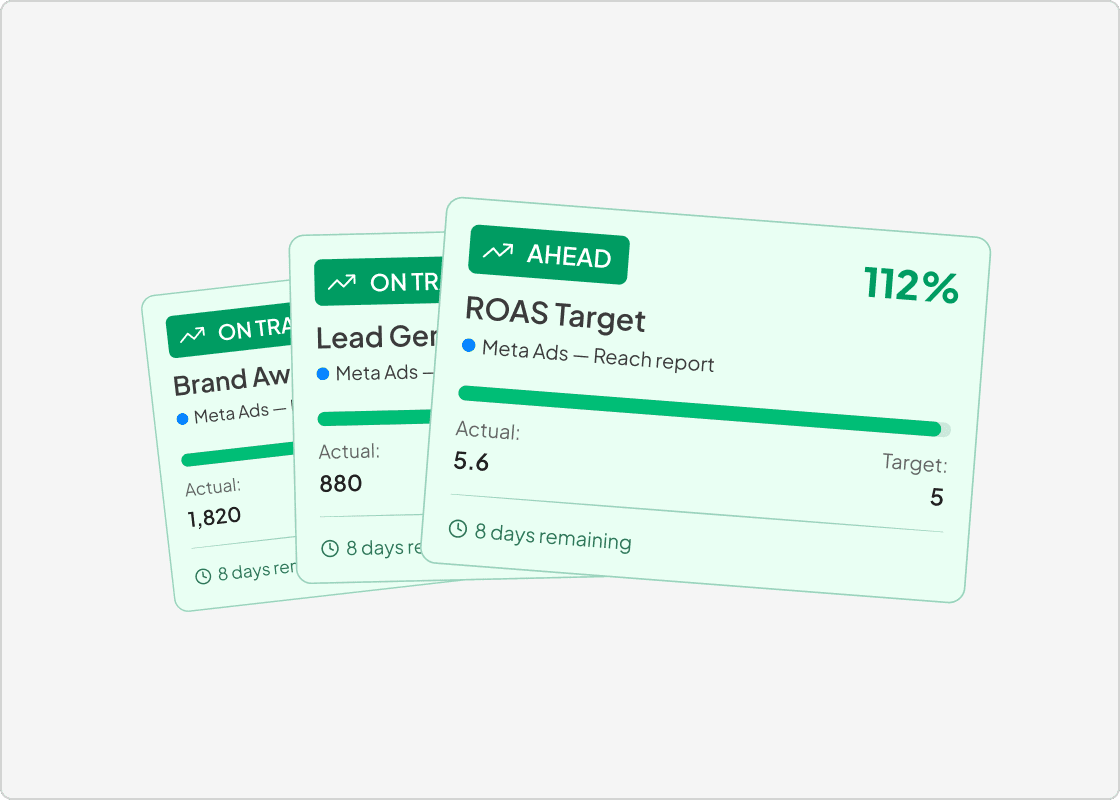
Goals & budget tracking
The goals module sets monthly targets per channel — spend caps, ROAS floors, revenue goals — and surfaces a real-time progress bar. Combined with alerts, this is how I catch overspend before it hits $10k instead of after.
Not as deep as a dedicated pacing tool, but enough for most clients. For one high-spend client running $80k/month across 14 campaigns, I pair TMR goals with a custom affiliate tracking tool stack. For tracking paid traffic quality across creatives, I also keep an eye on my AI creative testing cadence — TMR’s connector layer makes the underlying reporting repeatable.
Hidden feature worth knowing: Data blending. TMR’s data blending lets you join Google Ads spend to Shopify revenue by date in one query — the exact blend that makes the cross-channel ROAS view work. This used to require a custom API script.
Two Minute Reports integrations
The integration list is where the platform earns its keep. 30+ native connectors across paid ads, ecommerce, analytics, and CRM/email:
Paid ads integrations
The strongest category. Every major paid platform is supported:
- Google Ads — full metrics, hourly refresh on Pro, MCC support for agencies
- TikTok Ads — campaigns and ad groups
- LinkedIn Ads — campaigns, creatives, full cost + lead data
- Microsoft Ads — for Bing-heavy clients
- Pinterest Ads — niche but supported
- Reddit Ads — growing fast for direct-response ecommerce
- Amazon Ads — sponsored products + sponsored brands
The MCC support on Google Ads alone is worth the Pro tier for agencies — one connection pulls every sub-account.
Ecommerce integrations
- Shopify — orders, line items, customers, inventory, revenue attribution back to ad platforms
- WooCommerce — same depth as Shopify, for WordPress-based stores
- Amazon Seller Central — order + inventory + listing performance
- Stripe — payments, subscriptions, refunds
- PayPal — payments only
The Shopify integration is the one I lean on hardest. Revenue-by-UTM blended against spend-by-campaign is the single query that pays for TMR.
Analytics integrations
- Google Analytics 4 (GA4) — full GA4 API, custom dimensions, audiences, conversion events
- Google Search Console — for organic search reporting
- Mixpanel — for product analytics
GA4 support is mature. Most agencies under-use GA4 because the native Looker Studio connector is throttled — TMR’s connector doesn’t have that bottleneck.
CRM and email integrations
- Klaviyo — flows, campaigns, segments, revenue attribution. The one ecommerce clients ask about most.
- HubSpot — contacts, deals, campaigns, email performance
- Mailchimp — campaigns, lists, basic automations
- ActiveCampaign — automations + contacts
- Salesforce — enterprise CRM, on higher tiers
For B2B clients, the HubSpot connector covers lifecycle reporting finance teams ask for: leads by source, deals by stage, pipeline velocity. For ecommerce, Klaviyo is the workhorse — flow revenue attribution is genuinely hard to do anywhere else.
How I use integrations in practice: Five per client on average — Google Ads, GA4, Shopify, Klaviyo, and one CRM. That powers 90% of client deliverables. The rest get added when a specific client has a unique need (Amazon Ads for Amazon sellers, Mixpanel for product-led SaaS).
For per-connector walkthroughs, explore Two Minute Reports features on the official site.
Two Minute Reports pricing
Here’s the verified 2026 pricing straight from the Two Minute Reports pricing page. The headline numbers — $81/mo Lite, $248/mo Pro, $498/mo Business — are the starting point. The real cost depends on how many destinations and accounts you actually need. For the most current numbers, see the live pricing page.
| Feature | Lite | Pro | Business |
|---|---|---|---|
| Monthly price (annual) | $81/mo | $248/mo | $498/mo |
| Monthly price (monthly billing) | ~ $99/mo | ~ $299/mo | ~ $599/mo |
| Accounts per connector | 3 | 30 | 100 |
| Scheduling | Daily / weekly / monthly | Hourly / daily / weekly / monthly | Hourly / daily / weekly / monthly |
| Users | Unlimited | Unlimited | Unlimited |
| AI dashboards | Yes | Yes | Yes |
| API access | Yes | Yes | Yes |
| MCP / AI platforms | Yes (ChatGPT + Claude) | Yes | Yes |
| White-label reports | Limited | Yes | Yes |
| Query limit | Unlimited | Unlimited | Unlimited |
| Destinations included | 1 | 1 | 1 |
| Additional destination | + $41/mo | + $41/mo | + $41/mo |
| Additional account | + $7-8/mo | + $7-8/mo | + $7-8/mo |
| Free trial | 14 days, no credit card | 14 days, no credit card | 14 days, no credit card |
| Annual discount | ~17% off (2 months free) | ~17% off (2 months free) | ~17% off (2 months free) |
| Refund window | 30 days | 30 days | 30 days |
Pricing verified October 2026 — converted from the official rupee pricing at current exchange rates. Annual billing saves 17% (2 months free). The headline $248/mo is the annual number.
The pricing math nobody shows you
The headline price is the easy number. The real cost depends on three things:
- Destinations — every plan includes one destination. Looker Studio + Google Sheets together = +$41/mo. Most agencies need two destinations minimum. That’s $492/year extra.
- Accounts per connector — Pro includes 30 accounts per connector. If you have 50 Google Ads accounts, you need 20 extra accounts at $7-8/mo each — that’s $1,680-1,920/year extra.
- Annual vs monthly — annual saves 17% (2 months free). The headline $248/mo is annual. Paying monthly is ~$299/mo. Always go annual.
Real Pro-tier annual cost for an agency with 2 destinations and 50 Google Ads accounts: $248/mo Pro + $41/mo extra destination + ~$160/mo extra accounts (20 accounts × $8/mo) = $449/mo, or $5,388/year. Still cheaper than Supermetrics’ $479/mo solo tier.
The free trial is genuinely free — no credit card, full Pro features for 14 days. Refund window is 30 days from activation. Go annual to save 17%. To see current pricing, check the latest Two Minute Reports pricing.
Two Minute Reports pros and cons
Fourteen months in — here’s the honest list. Specific wins and specific annoyances, not the generic “easy to use” filler.
What works
- 30+ native connectors with mature API handling — no OAuth tokens expiring silently, no rate-limit surprises. Zero outages in fourteen months.
- Hourly refresh on Pro and Business — the differentiator versus Supermetrics, which has older 24-hour refresh windows on lower tiers. For flash-sale clients or Performance-Max pacing, that hourly window saves the day.
- Data blending that actually works — data blending joins Google Ads spend to Shopify revenue by date in one query. The blend that replaced my four-hour Monday report.
- The MCP integration for AI assistants — query your data from ChatGPT or Claude directly. “What was the Google Ads CPA trend last week” without opening a dashboard. Saves 15-20 minutes a day.
- White-label reports on Pro — white-label branding, your logo, your colors.
- 30 accounts per connector on Pro — most agencies don’t hit this ceiling.
- Capterra 4.7/5 across 40+ reviews — sustained, not a launch-week spike.
What doesn’t work
- Inconsistent Looker Studio load times with heavy blends — 5+ blended sources in one page, refresh takes 30-90 seconds. Looker Studio limitation, not TMR’s fault, but it shows up as “the report is slow.” Workaround: native AI dashboards, which load instantly.
- The $41/mo per additional destination fee — annoying if you want the same data in both Sheets and Looker Studio. Most teams need both.
- Fuzzy per-connector account math — the “30 accounts per connector” limit applies across all your connectors, not per connector. If you have 30 Google Ads accounts, you can’t add a Microsoft Ads account without paying the add-on.
- No native client portal — clients can’t log in to a branded portal like they can with AgencyAnalytics. For some agencies, this is a dealbreaker.
- Email support response times — 12-24 hour responses on non-urgent tickets. Need 1-hour SLA? Enterprise plans or a different tool.
The hourly refresh on Pro is the single biggest time-saver versus Supermetrics’ older 24-hour cycle. — 14 months in, my takeaway
Who should use Two Minute Reports?
Three groups genuinely benefit. If you fall into one of these, the math works.
Agencies running 3+ Google Ads clients
The core target. The $248/mo Pro tier pays for itself if you’re billing more than $1,500/mo per client. With 3+ clients at that rate, the subscription is 5-6% of monthly revenue — and it replaces 12+ hours a month of manual reporting work. The math flips negative at one client and positive at three.
If you’re a small agency running 2 clients on a single platform, TMR might still be worth it for the white-label and scheduling wins — but you’re closer to break-even.
In-house marketing teams running multiple channels
If you’re a marketing manager at a brand with one Google Ads account, one GA4 property, one Shopify store, and one Klaviyo account, TMR removes the need to maintain hand-rolled API scripts. The $81/mo Lite tier covers this cleanly.
For larger in-house teams — say, a brand running Performance Max across 5 markets and 12 countries — the Pro tier’s 30-account-per-connector limit and hourly refresh make sense. Read more about how I halved CPL in 90 days using a similar reporting cadence.
Freelance media buyers managing multiple retainers
Freelancers running 4-10 monthly retainers are the sweet spot for the Pro plan — same math as the agency case, but white-label reports do more of the heavy lifting because freelancers don’t have a brand behind them.
If you’re charging $2k/month per retainer and running 5 clients, TMR is a business expense that pays for itself in week one. The white-label PDF export goes straight to the client, your logo is on it, no third-party branding.
The “3-client break-even” rule: If you’re billing more than $1,500/mo per client, the $248/mo Pro tier pays for itself by replacing 4-8 hours/month of manual reporting work. At 3+ clients, the math is obvious. At 1 client, the math doesn’t work — try the free trial.
Who shouldn’t use Two Minute Reports?
Three groups should pick a different tool. Being honest about this is part of why I trust my own recommendations — TMR isn’t for everyone.
If you have one client and no plans to scale
The math doesn’t work at one client. You can do one-client reporting with Supermetrics’ free trial or even hand-built Google Sheets scripts. Don’t pay $248/mo to save 4 hours a month on one account. The break-even point is 3+ clients at $1,500/mo billing each.
If you need a branded client portal with login access
Two Minute Reports doesn’t ship a client portal. Clients can’t log in to a branded URL and view their dashboards. If that’s core to your agency’s positioning, the right tool is AgencyAnalytics — a different category: dashboard tool with login, not a data connector.
The workaround is scheduled PDF exports with white-label branding. For many clients, that covers the use case. For premium retainers where clients expect a login, it doesn’t.
If you need enterprise-grade ETL or data warehouse integration
TMR is a reporting connector, not an ETL platform. If you’re trying to land data in Snowflake, BigQuery, or Redshift and run SQL transformations on top, the right tool is Improvado (ETL-first, marketing-focused) or Fivetran/Airbyte (ETL-first, generic).
TMR can do this via its API access, but you’d be swimming upstream. For pure reporting, TMR wins. For warehouse-grade ETL, Improvado wins. Pick the right tool for the job.
Two Minute Reports alternatives
The honest comparison table — four tools that come up in every agency conversation:
| Tool | Best for | Pricing entry | Key differentiator |
|---|---|---|---|
| Two Minute Reports | Agencies + in-house teams on Looker Studio / Sheets | $81/mo Lite, $248/mo Pro | 30+ connectors, hourly refresh, data blending, MCP for AI |
| Supermetrics | Large enterprises already on Supermetrics | $239/mo Essentials, $479/mo Pro | Longest-running connector, biggest brand, but higher price and older refresh windows |
| AgencyAnalytics | Agencies needing a branded client portal with login | $12/mo per client, $79/mo Starter | Native client portal — clients log in to a branded URL. Data connector depth is shallower |
| DashThis | Agencies wanting a turnkey dashboard with zero Looker Studio work | $39/mo Plus, $249/mo Enterprise | No Looker Studio dependency — fully native UI. Data lock-in is the trade-off |
When to pick each one
- Pick Two Minute Reports if your team already lives in Looker Studio + Google Sheets, you want hourly refresh, and you need 30+ mature connectors at a fair price.
- Pick Supermetrics if your team is on the Supermetrics stack, has enterprise procurement, or needs brand-name recognition for client trust. For a full comparison of Supermetrics alternatives at lower price points, see my best Supermetrics alternatives guide.
- Pick AgencyAnalytics if a branded client portal with login access is core to your agency’s value proposition.
- Pick DashThis if you don’t want to touch Looker Studio and just need a turnkey dashboard.
Short version on TMR vs Supermetrics: cheaper at Pro ($248 vs $479), faster refresh windows. Supermetrics has the brand. Both solid. If you’re in affiliate or partnership space, see my Everflow vs Admitad vs MaxWeb comparison — TMR doesn’t replace those, it sits alongside them.
Is Two Minute Reports worth it?
Yes, for agencies and in-house teams running 3+ client accounts in Google Ads. At $248/mo Pro, it pays for itself by replacing 4-8 hours/month of manual reporting work — roughly $200-400 of billable time saved. At 3+ clients billing $1,500+/mo each, the math is obvious. At 1 client, the math doesn’t work — use a free trial or hand-built sheets.
The reasoning in three parts:
1. The time-saved math is real. Before TMR, Monday reports took 4 hours. With TMR, 20 minutes — most of which is reviewing, not building. That’s ~14 hours/month saved. At a modest $50/hour internal rate, that’s $700/month of time value against a $248/mo subscription. Net positive even before client-billing math.
2. Pricing math is honest once you account for add-ons. $248/mo is the floor, not the ceiling. Budget for $400-500/mo with two destinations and extra accounts. Still positive ROI, just not as cushy as the sales-call slide deck.
3. Alternatives are worse for this use case. Supermetrics costs more and has older refresh windows. AgencyAnalytics locks you into per-client pricing and lacks data depth. DashThis traps your data. Improvado is overkill — it’s ETL. For “connect ad + ecommerce data into Looker Studio or Sheets on a schedule,” TMR is the best price-to-feature ratio in 2026.
The honest counter-case: one client, no scale plans, or need a branded client portal with login — AgencyAnalytics or DashThis serve you better. For warehouse-grade ETL, Improvado is the right tool.
Ready to try it? Start your 14-day free trial →
Final verdict
This Two Minute Reports review comes down to a simple split. If you’re running 3+ Google Ads clients and want Looker Studio or Sheets output, TMR is the best price-to-feature ratio in 2026 — period. If you’re at one client or need a branded client portal, look at AgencyAnalytics or DashThis instead. Fourteen months in on Pro, I’m not switching. The hourly refresh, the mature 30+ connectors, the data blending that works, and the 2025 MCP integration have made this a load-bearing piece of my reporting stack.
The two scenarios where Two Minute Reports is unequivocally worth it: (1) you’re an agency running 3+ client accounts in Google Ads and you’ve been losing every Monday to manual reporting — TMR pays for itself the first week. (2) you’re an in-house team with 5+ data sources stitched into Looker Studio or Sheets and you need hourly refresh without hand-rolled scripts. The 14-day free trial unlocks the full Pro tier for two weeks — enough time to connect your real accounts and see whether the hourly refresh actually moves the needle for your stack.
The math isn’t perfect — the per-destination add-on, the per-account add-on, and the Looker Studio load times with heavy blends are real costs. But they’re costs I can plan around, and the alternative (hand-rolled scripts that break quarterly) is worse.
If you’re on the fence, see Two Minute Reports in action through the 14-day free trial. No credit card, no commitment. That’s how I started. Ready to skip the demo and try it? Start your 14-day Two Minute Reports free trial — no credit card needed.
Frequently asked questions
Is Two Minute Reports worth it in 2026?
Yes, Two Minute Reports is worth it in 2026 for agencies and in-house teams running 3+ client accounts in Google Ads. At $248/mo Pro, it pays for itself if you’re billing more than $1,500/mo per client. Capterra shows 4.7/5 across 40+ reviews. The counter-case: one client (try the free trial) or a branded client portal (use AgencyAnalytics).
What are the disadvantages of Two Minute Reports?
The main disadvantages are inconsistent Looker Studio load times, the $41/mo fee for additional destinations, fuzzy per-connector account math, and no native client portal. Looker Studio reports using TMR data with 5+ blended sources can take 30-90 seconds to load. The additional-destination fee is annoying if you want the same data in both Sheets and Looker Studio. Unlike AgencyAnalytics, TMR doesn’t ship a branded client login page. For warehouse-grade ETL, use Improvado.
How does Two Minute Reports compare to Supermetrics?
Two Minute Reports is cheaper at the Pro tier ($248/mo vs Supermetrics’ $479/mo) and has faster refresh windows. Supermetrics has brand recognition and longer track record. For pushing ad + ecommerce data into Looker Studio on a schedule, TMR is the better value in 2026. For enterprise procurement, Supermetrics still wins.
Does Two Minute Reports have a free trial?
Yes, Two Minute Reports offers a 14-day free trial with no credit card required. Full Pro-tier feature access for 14 days. The company also offers a 30-day refund window from activation — a combined 44 days to test before commitment. You can start your Two Minute Reports trial directly from the pricing page.
Can Two Minute Reports replace Looker Studio?
No — Two Minute Reports is a data connector, not a dashboard tool. It sends data into Looker Studio, Google Sheets, or its own AI dashboards. You’ll still use Looker Studio for complex multi-page client deliverables. The native AI dashboards work great for internal monitoring but aren’t a full Looker Studio replacement. For a fully native UI with no Looker Studio, look at DashThis.
Which Two Minute Reports plan should I pick?
Most agencies should start with the $248/mo Pro plan. Lite ($81/mo) covers only 3 accounts per connector and daily-only scheduling — fine for one-client freelancers, too restrictive for agencies. Pro includes 30 accounts per connector, hourly refresh, white-label reports. Business ($498/mo) at 100 accounts per connector only makes sense at 50+ client accounts. Go annual to save 17% (2 months free). Verify pricing at twominutereports.com/pricing.
Affiliate disclosure. Some links here are affiliate links. If you buy through them, I may earn a commission at no extra cost to you. Details.
I run Google Ads for lead-gen businesses and build the AI tooling that runs alongside them.